


Shopping List - SoftList
4.6220.00 Reviews
App Specs
- Version
- Varies with Device
- Updated On
- License
- Free
- Downloads
- 1,000,000+
- Developer
- Martins Softwares
- Categories
- Shopping
- Platform
- Android
Screenshots
 Analysis by AppCompare
Hey there, fellow list-makers! If you're anything like me, you probably have a hundred things swirling around in your head whenever you head to the store. That's where Shopping List - SoftList comes to the rescue. I've been playing around with this app for a while, and let me tell you, it's got some nifty features that might just make your shopping trips a whole lot smoother.
Decide What You Need from a Shopping List
Before choosing any shopping app, I think about what usually causes friction: forgetting essentials, buying duplicates, losing track of the budget, or trying to coordinate a trip with someone else. A basic checklist can solve the first problem, but the rest depend on how you shop. SoftList makes the most sense when you want a list that can also be organized, shared, and used to keep an eye on spending, rather than a bare note you replace every week.
That distinction matters if your shopping is split across different routines. A quick stop for a few groceries calls for speed; a larger household shop benefits more from grouping items and planning totals. I would not expect a list app to make decisions about what to buy for me. Its value is in keeping the decisions I have already made visible while I am in the store.
When Organization and Budget Awareness Help
My most useful approach is to build a list before leaving home, while I can still check the kitchen and cupboards. I can group ingredients by section, then make a separate pass through the list for household basics or snacks. That reduces the chance that I will remember an item only after I have passed the relevant aisle. It also makes a shared errand easier to divide: one person can pick up a short set of items while the other handles the rest.
Expense tracking is most useful when I treat it as an estimate rather than a promise of the final bill. Prices can vary, and a planned quantity may change once I see what is available. Entering expected costs before shopping helps me notice when a list is getting ambitious; updating them as I go gives me a clearer running picture. For a tight budget, I would leave a little room for price changes instead of planning right up to a fixed limit.
There is also a small but practical advantage to keeping recurring purchases in mind. If I tend to run out of the same staples, reminders can nudge me to add them before they become urgent. I would use that for predictable basics, not every item: too many reminders can become background noise and make the useful ones easier to ignore.
Getting Started with SoftList
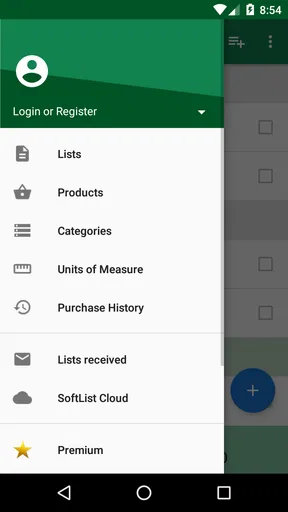
First off, downloading Shopping List - SoftList from the app store is a breeze. It’s compatible with both Android and iOS, so no worries there. Once you’ve got it on your device, diving into the app is pretty straightforward. The interface is clean and intuitive, which I always appreciate. No one wants to spend ages figuring out how to add a loaf of bread to their list, right?
Worth Reading Before You Choose

EA SPORTS FC Mobile 26 Is a Bigger Football Game, but It Takes Time

Flipboard Shows What News Apps Must Do Beyond the Feed

Switching to Android Auto Means Rethinking Your Driving Routine

Google Calendar Makes a Crowded Week Easier to Manage

Ludo King Makes the Most of the Minutes Between Plans

Baby Panda World Brings Quick Play to Modern Phones, but Its Game Library Feels Busy
SoftList is a free shopping app from Martins Softwares, with optional in-app purchases. It has a 4.6 average from around 53,000 ratings and has been installed over a million times. Its Everyone age rating makes it suitable for a broad audience, though I would still choose an app based on the way a household actually shops rather than on its popularity alone. The core appeal is practical: getting a list ready quickly and keeping it manageable while running errands.
Creating Your List
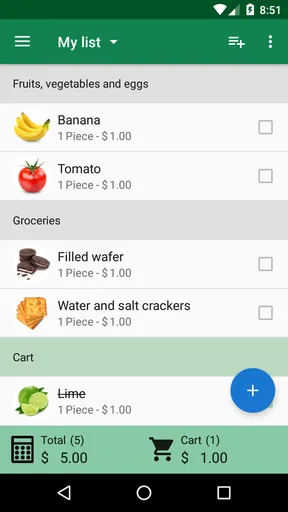
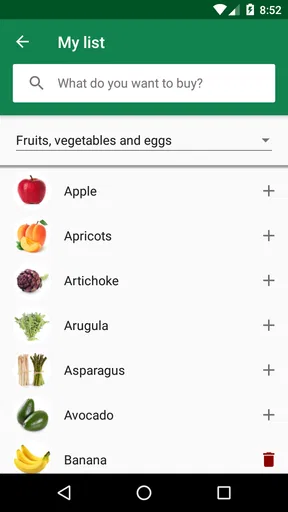
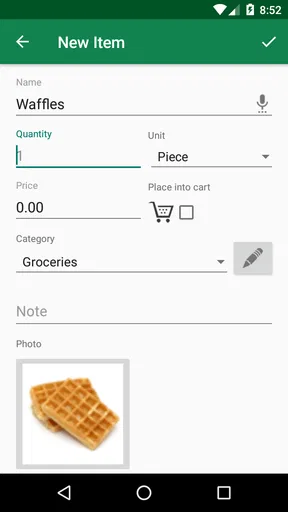
Adding items to your list is as easy as pie. You can type things in manually, or if you’re in a rush, just use the voice input feature. I tried both, and they work like a charm. For those of us who are super organized (or aspire to be), SoftList lets you categorize items. You can create sections like "Produce," "Dairy," or "Snacks" to keep everything neat and tidy. Personally, I love this feature because it saves me from zigzagging across the store.
One habit that makes categories more useful is keeping them consistent from trip to trip. I would not create a new section every time I shop; a familiar arrangement is easier to scan when I am in a hurry. It is also worth keeping item names specific enough to avoid confusion. “Apples” might be enough for a simple trip, while noting a variety or quantity can help when someone else is shopping for the household.
Voice input is handy when I have my hands full or think of an item while doing something else, but I would still glance over the list before heading out. Spoken item names can be less precise than a deliberate typed entry, particularly when a household uses its own shorthand. A quick review turns the convenience into a reliable list rather than a collection of guesses.
Tracking Expenses
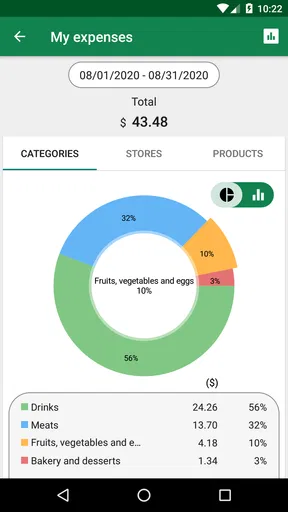
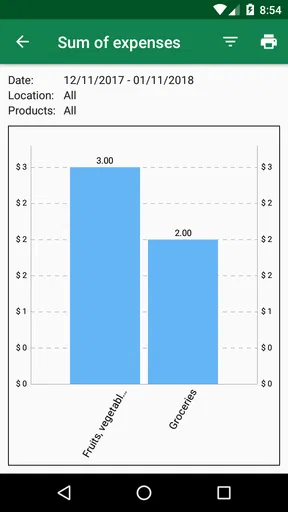
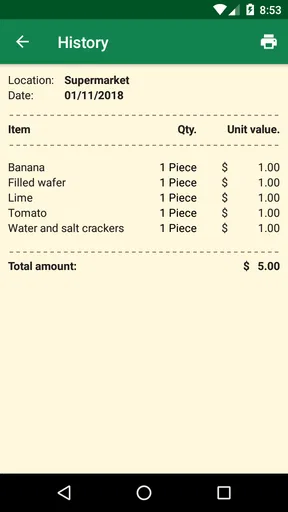
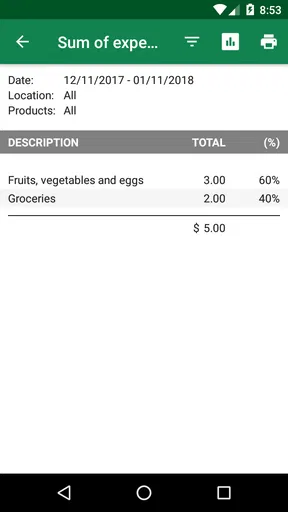
One of the standout features of SoftList is its ability to track expenses. You can input prices for each item and get a running total of your shopping bill. It's quite handy for budgeting. Plus, if you're a deal hunter, you can compare prices from different stores. I found this particularly useful during my last grocery run when I had to stick to a tight budget.
For a realistic weekly shop, I would enter the items I know I need and their expected prices before leaving, then use the total as a checkpoint. If the estimate is already close to what I can spend, I can reconsider optional treats at home instead of making that decision under pressure in the aisle. Price comparisons are most helpful for repeat purchases where the item and size are genuinely comparable; comparing unlike products can make a cheaper option look better than it is.
This is a planning aid, not a substitute for checking the receipt. If prices change or I choose a different product, the estimate can drift. That is a fair trade-off for anyone who wants a rough guide without turning a grocery run into a detailed accounting exercise. If exact household budgeting is the priority, a dedicated finance tool may suit that job better, while SoftList keeps the focus on the shop itself.
Sharing is Caring
Ever had to share a shopping list with someone else? SoftList makes this super easy. You can share your list via email or messaging apps. This came in handy when I needed to send my partner a list while I was tied up at work. They could just pop over to the store and pick up exactly what we needed without the usual back-and-forth texts.
A useful workflow is to send the list only after checking that quantities and any important details are clear. “Coffee” may mean different things to different people; adding a brand, type, or size when it matters can prevent a second trip. Sharing through a familiar messaging app also makes the list accessible to someone who may not want to learn a new system just for one errand.
The trade-off is that sharing a list is not the same as having a fully coordinated household inventory. If several people routinely edit the same plan at once, they should agree on who is buying what and when, rather than assume a message alone will prevent duplicate purchases. For occasional hand-offs, though, sending a clear list is a simple alternative to a string of texts.
Customization Options
I have to admit, I love a bit of customization, and SoftList delivers on that front. You can choose different themes for the app, which is a nice touch. While it might seem like a small detail, having an app that looks good makes me more likely to use it regularly. Plus, you can set reminders for recurring purchases, so you never forget the milk again!
The practical question is whether a setting makes the list easier to use, not whether it adds another thing to configure. I would pick a theme that is comfortable to read and then spend my attention on keeping the list useful. Reminders work best for items with a dependable rhythm; a staple used irregularly is better added when I notice it is running low. That keeps notifications from turning into a second list I have to maintain.
Offline Access
Another big plus is the offline access. If you ever find yourself in a store with spotty Wi-Fi or no reception, SoftList still has your back. You can access your lists without needing an internet connection, which has saved me a few times when I ventured into the depths of some store basements.
That makes it a sensible choice for shops where reception is unreliable, and it gives me less to worry about once I am already inside. I would still prepare the list before leaving and make sure any shared details have been sent to the other person in time. Offline access helps with using a list in the moment; it does not remove the need to plan a hand-off if someone else is doing the shopping.
How It Compares with Other Ways to Shop
Compared with a paper list, SoftList is easier to revise and can keep categories, costs, and reminders together. Paper still has a real advantage for someone who wants no screen to manage, or who likes to mark items off with a pen. A notes app is also a perfectly reasonable alternative for a very short list; it can be quicker if all I need is a few lines and I do not care about organizing a larger shop.
SoftList is a better fit when those extra layers are genuinely useful: grouped items, a running spending estimate, and a list that can be passed to another shopper. On the other hand, people who want advanced meal planning, a shared live household system, or detailed inventory management may prefer a tool built around those broader needs. I would not choose SoftList simply because it has more than a blank note; I would choose it if its particular shopping-focused tools match my routine.
Cost, Commitment, and Switching
Because the app is free to start, trying it does not require a paid commitment. Optional purchases are available, so I would check what is included before buying anything and only pay if a particular extra matters to my routine. The app has been around since September 21, 2014, which gives it a long history as a shopping-list option, but the best test is still whether the current version works well on your own device and fits your habits.
Switching from a paper list or a basic notes app is low effort if you start with one ordinary shop rather than rebuilding every household routine at once. Make a list for the next trip, use categories only where they help, and see whether the cost estimate or sharing saves time. If it feels like more upkeep than the old method, there is no reason to force the change. A shopping tool should reduce small hassles, not create a new chore.
Final Thoughts
In the sea of shopping list apps out there, Shopping List - SoftList stands out with its user-friendly interface and practical features. Whether you’re a meticulous planner or someone who just wants to get through the store as fast as possible, this app has something to offer. It's not just about making lists; it's about making your life easier and your shopping trips more efficient.
So, if you’re looking to up your organization game, give SoftList a go. You might just find that it turns your chaotic shopping sprees into a well-oiled operation. And hey, anything that makes grocery shopping a little less of a chore is a win in my book!
Who I Would Recommend It To
I would recommend SoftList to someone who shops for a household, often buys the same staples, or wants a quick way to pass an errand to a partner or family member. Its best case is not an elaborate planning system; it is a dependable place to gather what needs buying, sort it into a useful order, and keep an eye on likely spending. Someone who mainly wants a tiny one-off checklist may find paper or a standard notes app simpler, while a shopper looking for a wider meal-planning or inventory workflow should look at alternatives in that area.
My clearest test would be a normal grocery run: check what is missing before leaving, group the list so the route through the store feels natural, and add estimated prices only for the items where a budget check matters. If another person is shopping, send a version with details that remove guesswork. That modest routine uses the app’s strengths without asking it to become a complete household manager.
Overall, I see SoftList as a practical middle ground between a scrap of paper and a more involved shopping system. I would try it if sorting, sharing, or spending awareness would solve a recurring annoyance; I would skip it if a plain note already does everything I need. The right choice is the one I will actually keep updated, and SoftList earns a place on my phone when its extra organization saves more effort than it takes.
Pros
- Intuitive user interface makes navigation easy.
- Customizable categories for personalized lists.
- Supports voice input for quick additions.
- Syncs across devices for seamless access.
- Barcode scanning for effortless item entry.
Cons
- Limited free features; premium needed for full access.
- Occasional sync issues reported by users.
- Ads can be intrusive without premium upgrade.
- No offline mode; requires internet connection.
- Some users find the setup process cumbersome.
FAQs for Shopping List - SoftList
What features does Shopping List - SoftList offer?
Shopping List - SoftList provides a user-friendly interface for creating and managing shopping lists. It includes features such as item categorization, quantity tracking, price estimation, and synchronization across multiple devices. Users can also share lists with family or friends, making collaborative shopping easier and more efficient.
Is Shopping List - SoftList available for both Android and iOS?
Yes, Shopping List - SoftList is available for download on both Android and iOS platforms. Users can find it on the Google Play Store and the Apple App Store. The app offers a consistent experience across both operating systems, ensuring that features and functionality remain the same regardless of the device used.
Does Shopping List - SoftList require an internet connection to function?
Shopping List - SoftList can function without an internet connection for basic list creation and management. However, to utilize features like synchronization across devices and sharing lists with others, an internet connection is necessary. Offline capabilities ensure users can still access their lists while shopping in areas with poor connectivity.
Are there any costs associated with using Shopping List - SoftList?
The app is free to download, but it may offer in-app purchases or a premium version with additional features, such as ad removal or enhanced list management tools. Users can choose to use the free version indefinitely or upgrade if they find the premium features beneficial for their shopping needs.
How secure is my data on Shopping List - SoftList?
Shopping List - SoftList prioritizes user privacy and data security. The app implements encryption for data stored on devices and during synchronization across the cloud. While user data is protected, it’s advisable to review the app’s privacy policy to understand how personal information is handled and what measures are in place to safeguard it.


